

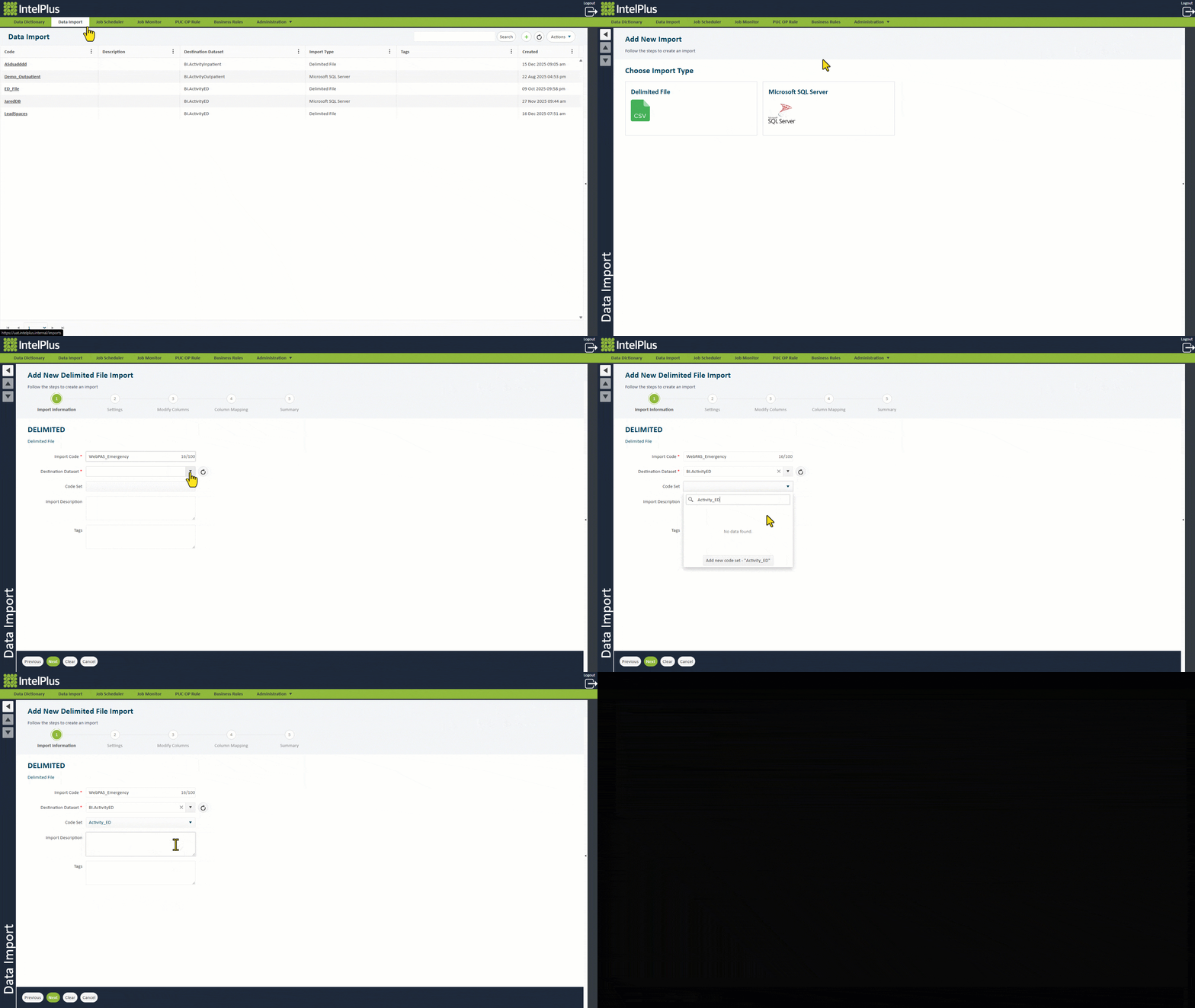
To begin the process of creating a new Import:
a) Open IntelPlus and go to the “Data Import” page.
b) Click  on the top right of the page.
c) Choose the data source type (MS SQL, Delimited File, Oracle etc).
This opens the wizard taking you to Step 1 of 5. Important information is required before moving on.
- Provide an Import Code. (Required)
Best practice:
- Incorporate the source system in the code, so that if your systems change, there is a distinction between them, e.g. OracleFusion and TechOne.
- If you have multiple imports from the same source system, provide the source system first followed by the module/area, e.g. WebPAS_Inpatient and iPM_Inpatient.
- Avoid spaces or special characters.
- Divide words with uppercase, underscores or dashes.
- Select the Destination Dataset for the source data. (Required)
- Set the Code Set to the source system – either add it if new or select if already existing.
- Provide a description of the Import.
Best Practice:
- Summarise where the data comes from and what the data is used for.
- Provide a list of tags to be used for fast searching.
- Click NEXT.
The image below illustrates Step 1 using examples.
Feedback
Copyright © 2026 CBS
—
Powered by 
Post your comment on this topic.